 Analyst Bootcamp
The feature that worked for everyone
A support tool got a new "view customer orders" screen. It worked beautifully. It also worked for the marketing intern, for a contractor whose access should have ended in March, and for anyone who changed the customer id in the URL. Nobody had written down who may see what, so the system let everyone.
Two different questions hide in "who may do what", and they have different answers:
- Authentication: who is calling? (a logged-in customer, a support agent, another service, a partner's server)
- Authorisation: given who they are, may they do this to that?
The system analyst specifies both, in that order, for every feature. It takes an hour and it is the hour that prevents the audit finding.
Authentication: how callers prove who they are
You rarely design this from scratch; you pick from what the platform already has and state it in the ticket:
| Caller | Usual mechanism | What the ticket says |
|---|---|---|
| Customer in the web or app | session cookie or OAuth 2.0 / OpenID Connect token | "customer identity from the existing login; token carries customer id" |
| Staff in an internal tool | company single sign-on (OIDC via the identity provider) | "SSO required; roles come from the IdP groups" |
| Another internal service | service token or mutual TLS | "service identity orders-service; no user context" |
| A partner's server | API key or OAuth client credentials, scoped | "partner key, scoped to their own shipments, rotated yearly" |
The point of the table is the last column: the ticket names the mechanism, where the identity comes from, and what the token carries. Without it, developers hard-code a check and the second caller type breaks it.
Authorisation: roles, ownership, and the matrix
Most Junior+ features need two kinds of rule, and they combine:
- Role: what a kind of user may do. Customers may create orders; agents may refund; admins may change roles.
- Ownership: on whose data. Customers see their own orders; team leads see their team's tickets; partners see their shipments.
Write both as a matrix, one row per action, one column per role, and the cell says the scope:
| Action | Customer | Support agent | Support lead | Finance | Service: orders |
|---|---|---|---|---|---|
| View order | own | any | any | any | any |
| Create order | own | on behalf, logged | on behalf, logged | — | yes |
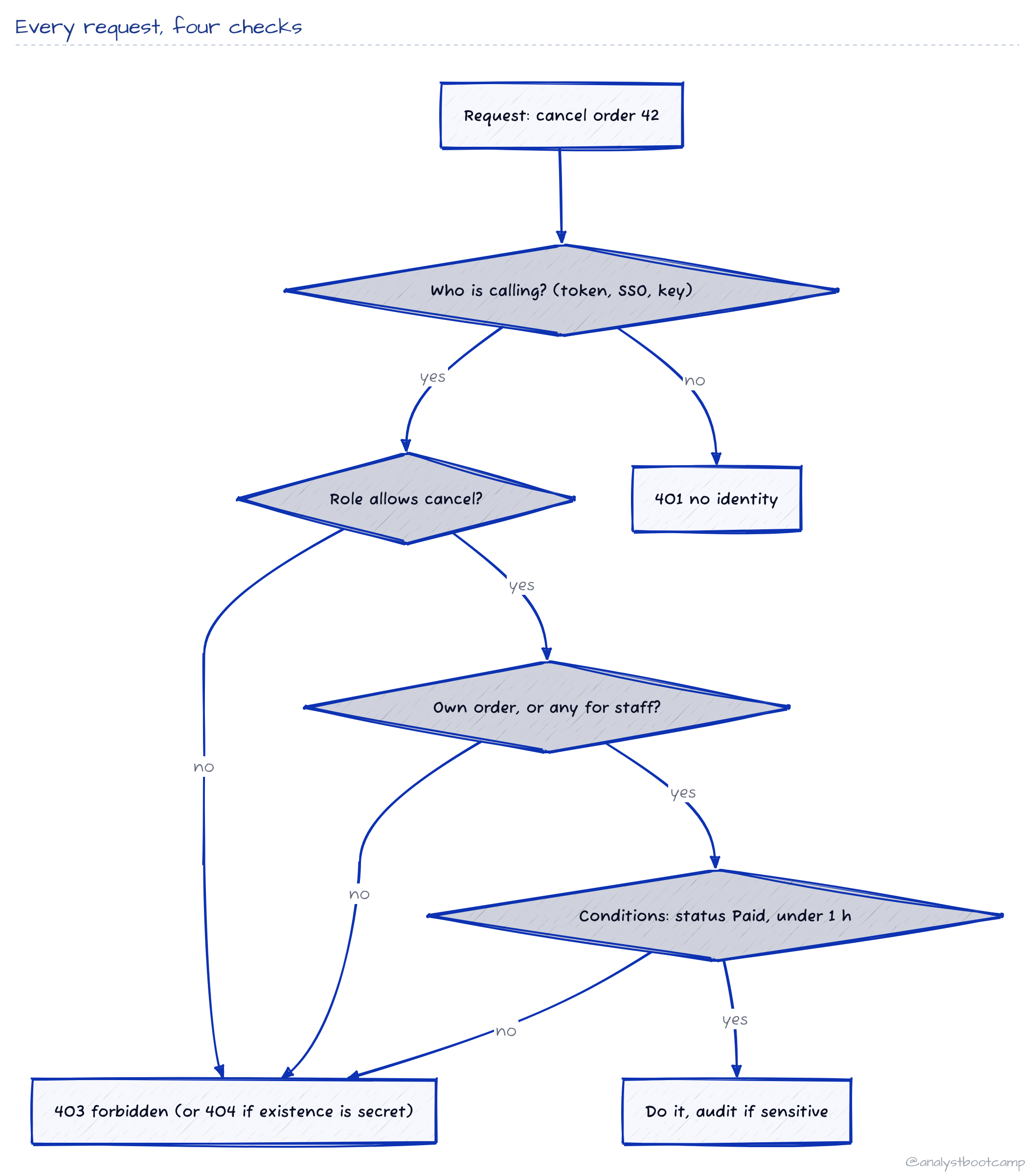
| Cancel order (Paid, < 1 h) | own | any | any | — | — |
| Cancel order (Paid, > 1 h) | — | any, reason required | any | — | — |
| Refund | — | ≤ 100, own queue | any amount | any | — |
| Export orders CSV | — | — | own team | all | — |
| Change customer e-mail | own, re-verify | — | with ticket id | — | — |
Reading the matrix: the limit on refunds is a rule, not a role; "on behalf, logged" is an audit requirement; the service account can create but never cancel. All of those would otherwise be discovered in code review, or in production.
The three rules that get forgotten
- Deny by default. Anything not in the matrix is forbidden. A new action gets a row before it gets an endpoint.
- Check ownership on the server, by the identity in the token, never by an id the client sends. The URL's customer id is a request; the token's customer id is the truth. The "change the id in the URL" bug is exactly this rule missing.
- Audit the sensitive rows. "On behalf", refunds, exports and role changes write who did what, to whom, when, and why (the ticket id). The ticket says which rows are audited and where the log lives.
Lifecycle: joining, changing, leaving
Permissions are a process, not a table. Three questions for the ticket:
- Who grants a role, and how? (the IdP group managed by IT; an admin screen; a request form)
- What happens when someone changes team? (roles follow the IdP; or someone has to remove the old one, which they will not)
- What happens when someone leaves? Access ends with the SSO account; API keys for partners have an owner and an expiry.
The contractor from the first paragraph is a lifecycle failure, and the fix is a line in the ticket: "staff access only via SSO; no local accounts".
What goes where
- The matrix and the three rules: in the feature ticket, reviewed by the product owner (who decides the business rules) and by security or the platform team (who own the mechanism).
- The error codes: 401 for no or invalid identity, 403 for a valid identity without permission, 404 instead of 403 when revealing existence is itself a leak (another customer's order).
- Acceptance criteria: one allowed and one forbidden scenario per sensitive row.
With AI
Models produce a plausible role matrix for a generic shop in seconds. They will not know that your agents have a refund limit, that finance exports everything, or that your IdP groups define roles. Use the model to draft the rows and columns; fill the cells with the product owner; ask the platform team to confirm the mechanism row.
Try it (5–10 minutes)
Feature: "Managers approve their team's expense claims; finance pays them; employees see their own history; auditors read everything but change nothing."
- Write the authentication row for each caller type (employees, finance, an auditor from an external firm, the payroll system).
- Build the matrix for: submit claim, approve claim, reject claim, pay claim, view claim, export claims. Add two conditions (amount limit; no self-approval).
- Write one allowed and one forbidden Gherkin scenario for "approve", and the three lifecycle lines.
Where this shows up in real work
- System analyst job posts list "access control", "RBAC" and "working with security on requirements"; interviewers ask "who should be able to see this, and how do you make sure?".
- In real audits (SOC 2, ISO 27001, GDPR) the permission matrix with an audit log is the evidence auditors ask for; the team that has it finishes the audit in a day.
- Freelance SaaS builds: the client who receives a matrix stops discovering "oh, and managers should not see salaries" after launch.
Sources worth reading
Practice it on real drills
Roles, permissions & access rulesREST API design for a featureRegulatory / policy change adoption