 Analyst Bootcamp
"Something went wrong"
That message is what a system says when nobody designed its errors. The user cannot act on it, the frontend cannot branch on it, support cannot search for it, and the developer on call finds a stack trace with no request id. Error design is a Junior+ system analyst's job because it sits exactly between the business ("what should the customer do?") and the code ("what should the client do?").
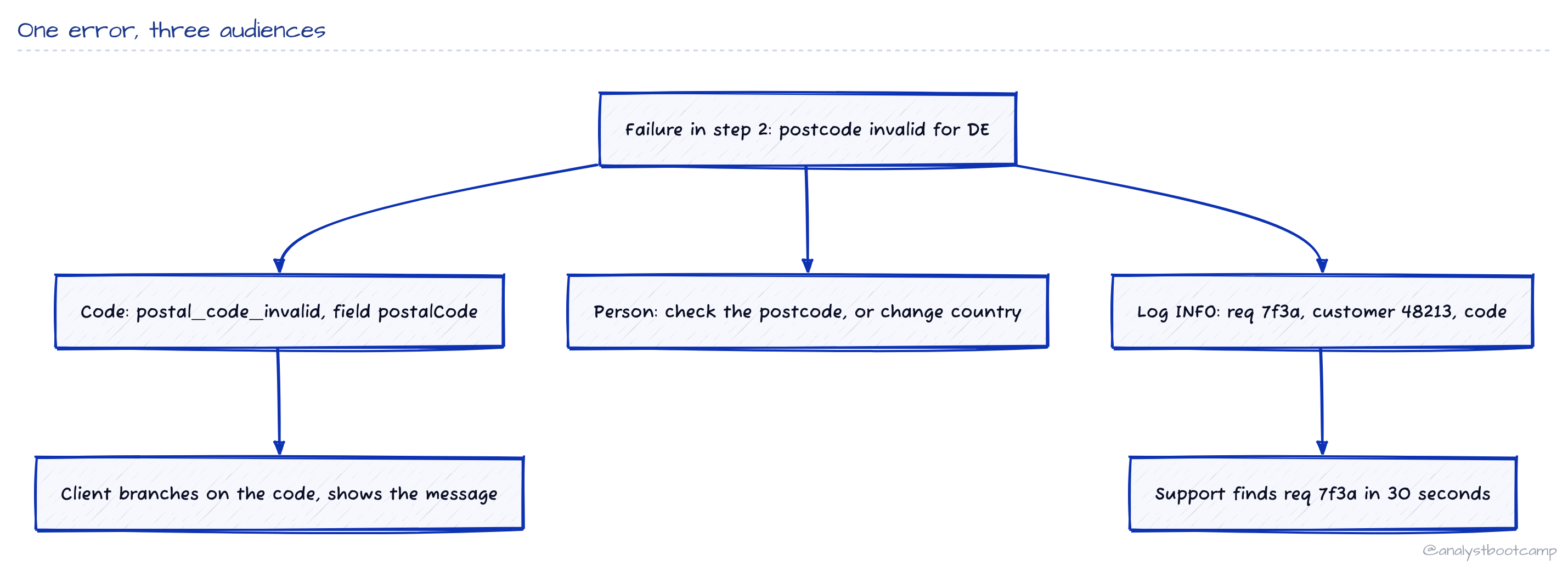
Every error needs three audiences served at once:
| Audience | Needs | Example |
|---|---|---|
| The person | what happened, what to do next, in their language | "This postcode is not valid for Germany. Check it or choose another country." |
| The client program | a stable code to branch on, and the field it concerns | code: postal_code_invalid, field: postalCode |
| On-call and support | a request id, the time, the inputs that matter, severity | req 7f3a, customer 48213, country DE, postcode 1011 |
A good error carries all three. A bad one carries a stack trace to the person and a smile to the log.
Step 1: list the errors from the flow
Walk the use case or the sequence diagram and write down every way each step can fail. For "save a delivery address" the list is short and complete:
| # | Failure | Who caused it | HTTP | Code |
|---|---|---|---|---|
| E1 | required field missing or too long | client | 400 | validation_failed (+ field) |
| E2 | postcode invalid for the country | client | 400 | postal_code_invalid |
| E3 | not the customer's own account | client (or an attack) | 403 | forbidden |
| E4 | customer not found | client | 404 | customer_not_found |
| E5 | sixth address | client, by rule | 409 | address_limit_reached |
| E6 | postcode service down | dependency | 503 | postcode_service_unavailable |
| E7 | database error | us | 500 | internal_error |
Three columns do the work: who caused it decides whether retrying makes sense; the status tells generic HTTP clients what kind of failure it was; the code is what the frontend and the tests use. The code is stable across versions and languages; the message is not.
Step 2: the status is a category, the code is the reason
Use a small set of statuses consistently and stop arguing about the rest:
- 400 the request is malformed or breaks a validation rule (fix the input and retry).
- 401 not authenticated; 403 authenticated but not allowed (do not retry).
- 404 the thing is not there (do not retry; check the id).
- 409 the request conflicts with current state: a limit, a duplicate, a transition the state machine forbids (do not retry blindly; show the user why).
- 422 the body is well-formed but semantically wrong, if your API distinguishes it from 400; many teams use 400 for both. Pick one and write it in the guidelines.
- 429 slow down (retry after the header says).
- 500 our bug; 503 a dependency or overload (retry with backoff).
The rule of thumb the client follows: 4xx means change something before retrying; 5xx means wait and retry; 429 means wait exactly as told. Write that sentence in the API guidelines once, and every integration inherits it.
Step 3: one error shape
The body is the same for every error in the API (RFC 9457, Problem Details, with a small extension for field errors):
{
  "type": "https://api.example.com/problems/address-limit",
  "title": "Address limit reached",
  "status": 409,
  "detail": "You can save up to 5 addresses. Delete one to add another.",
  "code": "address_limit_reached",
  "requestId": "7f3a-2026-10-14",
  "errors": [{ "field": "addresses", "code": "limit", "limit": 5 }]
}
The requestId is the line that connects the person to the log. Support asks the customer for it ("the code at the bottom of the message"), finds the request in thirty seconds, and the on-call developer sees the inputs. Without it, every support escalation starts with "roughly when did this happen?".
Step 4: what the person sees
Messages come from the code, not from the server text. The frontend keeps a table code → message per language, with a fallback for unknown codes ("We could not save the address. Try again in a moment; if it keeps happening, contact support with code 7f3a"). Rules for the messages:
- Say what to do, not what the system did. "Check the postcode" beats "validation error".
- Never blame the person or expose internals: no "invalid input", no table names, no stack traces.
- Match the retry rule: 5xx messages say "try again"; 4xx messages say what to change.
- Keep the request id visible for anything that may need support.
Step 5: what the log says
Each error logs one structured line at the right level. The ticket states the level, because developers will otherwise log everything as ERROR and on-call will mute the channel:
- INFO for expected client errors (E1–E5): they are the system working. Count them; alert only on a sudden rise (a broken frontend release).
- WARN for degraded dependencies (E6): the fallback worked or the user got a clear message.
- ERROR for our bugs (E7): someone is paged.
Each line carries the request id, the code, the customer id (not the e-mail), and the input fields that matter, with personal data masked.
Writing it into the contract
Each operation in the OpenAPI document lists its responses (see From a user story to an OpenAPI contract). The error table above is the source: one response per status, with the codes that status can carry in the description, and an example body for each. Acceptance criteria follow: "Given a customer with 5 addresses, When they POST a sixth, Then 409 with code address_limit_reached and no address is created."
With AI
Models produce a decent generic error table and know RFC 9457. They do not know your rules (the limit, the forbidden transitions), your log levels, or your support process (who reads the request id). Use the model for the shape; fill the rows from your use case and decide the levels with the team that gets paged.
Try it (5–10 minutes)
Flow: "Customer redeems a gift card at checkout." Rules: card must exist, be active, not expired, have balance; one card per order; the card issuer's API may be down.
- Build the error table: at least seven rows with cause, status, code.
- Write the Problem Details body for "card already used on another order", with a requestId and a field error.
- Decide the log level and the user message for each of: card expired, issuer API down, duplicate redemption from a retry. Which one is a 409 and why?
Where this shows up in real work
- System analyst and API designer job posts ask for "error handling design" and "API guidelines"; interviewers hand you an endpoint and ask what it returns when things go wrong.
- In real teams the error table is what ends the frontend/backend argument about "who shows what"; the request id is what cuts support escalation time in half.
- Freelance API work: a client who receives an error catalogue with codes and messages stops asking "what does the user see?" in every review.
Sources worth reading
Practice it on real drills
Failure scenarios & error handlingREST API design for a featureRequirements from a production incident