 Analyst Bootcamp
The column that runs the business
An order has a status. A ticket has a status. A refund, a booking, a job application, a contract: all status. The word is so ordinary that teams write it as a free-text column and let every screen interpret it differently. Six months later support asks "why is this order shipped but not paid?" and the honest answer is "nothing stopped it".
A status is a state, and a feature that changes status is a transition. Write them down as a state machine before the first ticket, and the three questions that cause most status bugs get answered once:
- Which states exist, and what does each one mean to the business?
- From which state can you go to which, and who or what triggers it?
- What must happen on each transition (notify, charge, lock, log)?
The diagram
A state diagram has one box per state and one arrow per allowed transition, labelled with the trigger. Here is the one for an online order, the way most retailers actually run it:
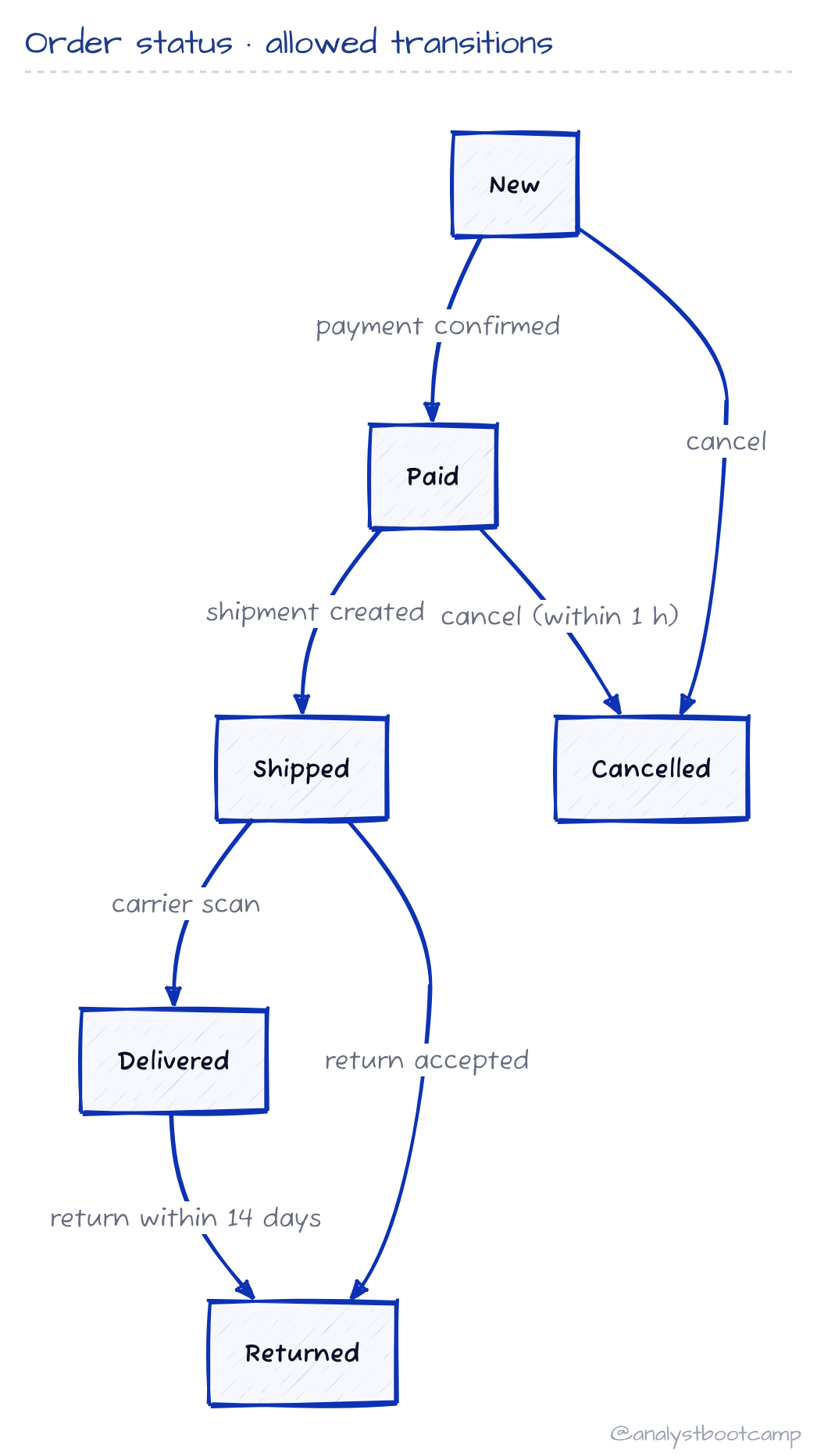
What the picture says that a status list never does:
- Missing arrows are rules. There is no arrow from New to Shipped: an unpaid order cannot ship. There is no arrow out of Delivered except to Returned: a delivered order cannot be cancelled, only returned.
- Triggers name the actor. "Payment confirmed" is the payment provider; "Cancel" is the customer or support; "Carrier scan" is the carrier's system. Each one is an integration or a permission.
- Terminal states are visible. Cancelled and Returned have no outgoing arrows. Anything that tries to move them is a bug, and the diagram makes it obvious.
The transition table
The diagram is for understanding; the table is for building and testing. One row per allowed transition:
| From | To | Trigger | Who / what | On transition |
|---|---|---|---|---|
| New | Paid | payment confirmed | payment provider (webhook) | send receipt; reserve stock |
| New | Cancelled | cancel | customer, support | release reservation if any |
| Paid | Shipped | shipment created | warehouse system | send tracking e-mail |
| Paid | Cancelled | cancel | customer (within 1 h), support | refund in full; release stock |
| Shipped | Delivered | carrier scan "delivered" | carrier (webhook) | start 14-day return window |
| Shipped | Returned | return accepted | support | refund; restock on receipt |
| Delivered | Returned | return accepted (within 14 days) | support | refund; restock on receipt |
Everything not in the table is forbidden. That single sentence is the most useful acceptance criterion a status feature can have, and it is testable: a tester tries every forbidden pair and expects an error.
Acceptance criteria that come from the table
Three rows become three scenarios, almost mechanically:
Scenario: Paid order is cancelled within the hour
Given an order in status Paid, paid 40 minutes ago
When the customer cancels it
Then the status is Cancelled
And a full refund is requested from the payment provider
And the reserved stock is released

Scenario: Paid order cannot be cancelled by the customer after an hour
Given an order in status Paid, paid 2 hours ago
When the customer tries to cancel it
Then the status stays Paid
And the customer sees "Contact support to cancel"

Scenario: Late webhook on a terminal state is ignored
Given an order in status Cancelled
When a "payment confirmed" webhook arrives for it
Then the status stays Cancelled
And the event is logged for review
The third scenario is the one teams forget and the one that produces "shipped but not paid" six months later.
Statuses that are really two things
Two smells that mean the model needs a second look:
- A status that encodes two facts. "Paid-and-shipped", "Shipped-pending-refund". That is two state machines (payment, fulfilment) squeezed into one column. Split them; each gets its own small table.
- A status that is a flag. "Flagged for review", "VIP". Flags can be true at the same time as any state; they are attributes, not states. Keep them out of the status column.
A good test: can the thing be in two of these at once? If yes, they are not states of the same machine.
History: who moved it, and when
The status column stores the present. The business almost always needs the past: when did it ship, who cancelled it, how long was it in Paid. Ask for a status history table (order_id, from, to, at, by, reason) in the first version, not the third. It costs one table; it answers every support question and every "average time to ship" report.
With AI
A model will draw a plausible state machine from a paragraph, and that is a good starting point for the conversation. It will not know your cancellation window, who is allowed to force a transition, or whether returns need receipt first. Fill the "Who" and "On transition" columns yourself, from the people who do the work, and treat every arrow the model drew as a question, not a decision.
Try it (5–10 minutes)
Pick a job application process: Applied → Screening → Interview → Offer → Hired, with rejection possible at every step and withdrawal by the candidate.
- Draw the state diagram. Mark terminal states.
- Build the transition table with trigger, actor and "on transition" (at least one notification and one deadline).
- Write the acceptance criterion for one forbidden transition and one terminal-state event that must be ignored.
Where this shows up in real work
- System analyst and backend-adjacent BA job posts ask for "workflow / state management" and "status lifecycle design"; interviewers hand you an order or claim process and ask for the states and the forbidden moves.
- In real backlogs, "status stuck" and "wrong status after X" are the most common support escalations; the transition table is the artefact that ends the argument about what should have happened.
- Freelance briefs for booking, CRM and approval tools are state machines in disguise; the first deliverable the client understands is the status diagram.
Sources worth reading
- Martin Fowler: state machine (Domain-Specific Languages, chapter excerpt)
- UML state machine diagrams: notation reference (uml-diagrams.org)
- Stripe docs: PaymentIntent statuses and lifecycle (a public, well-documented state machine)
- XState docs: states, transitions and events (the vocabulary, with examples)
Practice it on real drills
Entity lifecycle / state machineEvent-driven design (events & consumers)Operational incident root cause