 Analyst Bootcamp
The report that bounces
"Customer says the discount did not apply. Please check."
A developer opens this, finds nothing to check, asks three questions, waits two days, and the ticket is "cannot reproduce". Nobody was lazy; the report simply had no evidence. A Junior+ analyst sits between the complaint and the developer, and the job is to turn the first into something the second can act on in one sitting.
The method has four steps: collect, reproduce, narrow, write.
Step 1: collect the evidence
Before anyone looks at code, gather what already exists:
| Source | What to get | Where it usually is |
|---|---|---|
| The person who reported it | exact time, what they clicked, what they expected, what they saw (screenshot) | support ticket, chat |
| The record | order id, user id, amounts, status | admin panel, database read access |
| Application logs | the request around that time, with its id and any error | Kibana, Grafana Loki, Datadog, CloudWatch, Sentry |
| Recent changes | releases and config changes in the last days | release notes, deploy channel, feature flags |
The single most valuable thing to ask the reporter is "what time, roughly, and which order?". With an id and a timestamp you can find the request; without them you are searching a day of logs for a feeling.
Step 2: read the log like a story
A log is a sequence of events with timestamps, usually with a request id that ties them together. You do not need to understand every line; you need to find the request and read it top to bottom.
2026-10-14T09:41:03.118Z INFO  req=7f3a POST /checkout user=48213 cart=cart_9912
2026-10-14T09:41:03.142Z INFO  req=7f3a promo.lookup code=WELCOME10 result=found expires=2026-10-31
2026-10-14T09:41:03.150Z WARN  req=7f3a promo.validate code=WELCOME10 reason=min_order_not_met subtotal=4800 min=5000
2026-10-14T09:41:03.201Z INFO  req=7f3a order.created id=ord_55120 total=4800 discount=0
2026-10-14T09:41:03.230Z INFO  req=7f3a email.sent template=order_confirmation
Reading this as a story: the customer checked out with code WELCOME10; the code exists; validation refused it because the subtotal (48.00) is below the minimum (50.00); the order was created without a discount; the confirmation went out. The system did exactly what it was told. The bug, if there is one, is somewhere else: maybe the page promised the discount anyway, maybe the minimum should be 40, maybe the subtotal should have included something it excluded.
Three habits for reading logs:
- Filter by the request id first, then widen to the user id, then to the time window. Each step multiplies the noise; start narrow.
- Read WARN and ERROR lines, then the INFO around them. The warning usually names the rule; the info lines give the numbers.
- Note the numbers in the log, not the ones in the complaint. The customer says "my order was 52 euros"; the log says 4800 cents. Both can be right (shipping, VAT, a removed item). The difference is a lead.
Step 3: reproduce and narrow
A bug is reproduced when you can make it happen on purpose. Try on a test environment with the same inputs:
- Same code, same cart contents, same user type. Does it fail? If yes, you have it.
- If not, change one thing at a time toward the real case: a logged-in user versus guest, the mobile site versus desktop, a saved address versus new.
- When it fails, remove things until it stops failing. The last thing you removed is the trigger.
For the discount case this takes ten minutes and ends with: "Reproduced: with a cart of 48.00 and shipping of 4.90 the page shows 'WELCOME10 applied, -4.80' before payment, then the order has no discount. The page counts shipping toward the minimum; the backend does not."
That sentence is the bug. Notice it names two behaviours that disagree, which is what most bugs are, and does not say which one is right. Deciding that is the product owner's call, and the ticket should ask for it.
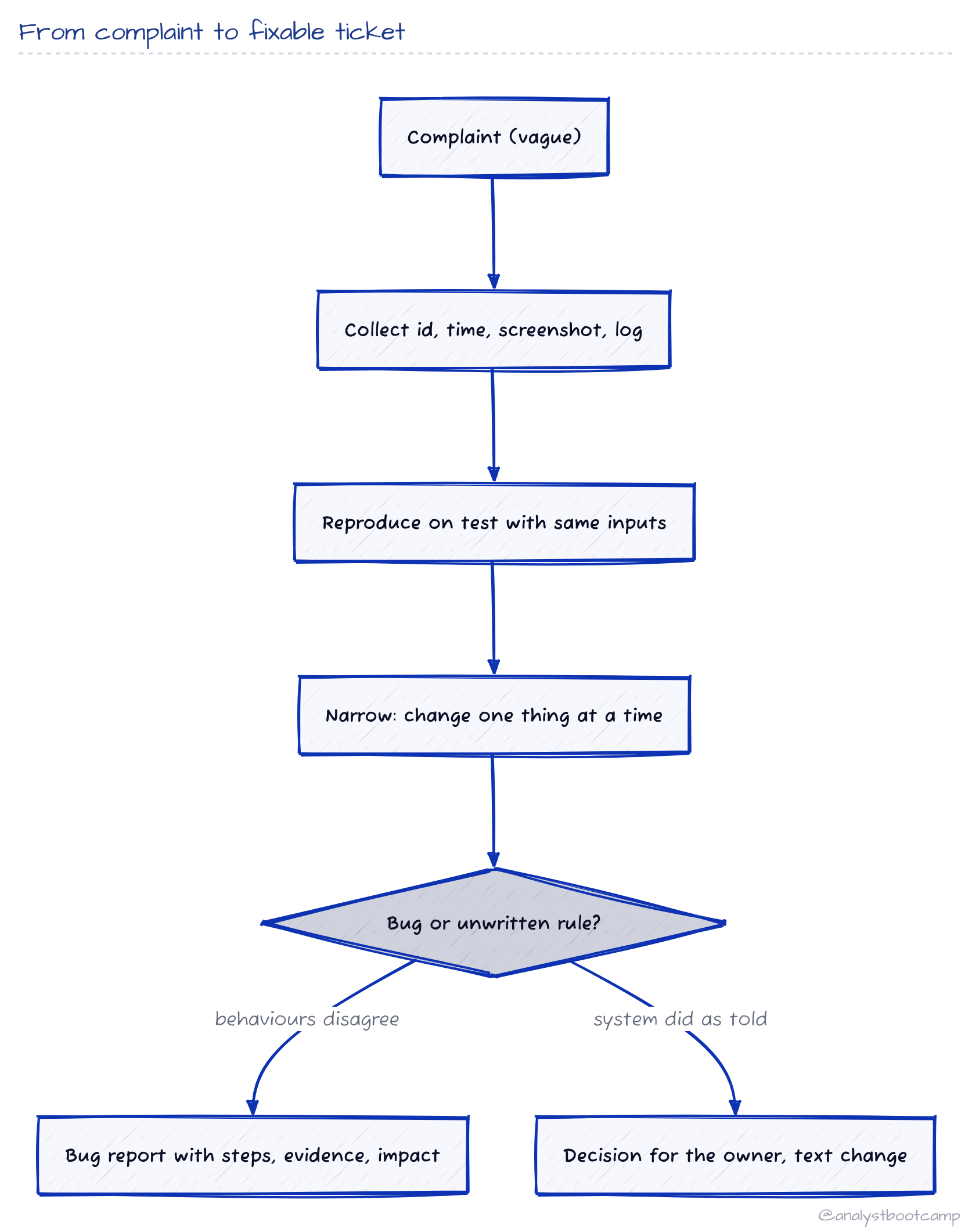
Step 4: write it so it gets fixed
A bug report has a fixed shape, and the shape matters more than the prose:
- Title: what breaks, in one line, with the condition. "Promo discount shown on checkout page but not applied when shipping lifts the cart over the minimum".
- Environment: production or test, web or app, version if visible.
- Steps to reproduce: numbered, from a clean state, with exact inputs.
- Expected: what should have happened, and where that rule comes from (the ticket, the page, a decision).
- Actual: what happened, with the evidence: screenshot, log lines, order id.
- Impact: how many, how often, how much money. "14 orders yesterday with the same warning" is one log query away and changes the priority.
- Open question: the decision a developer cannot make. "Should shipping count toward the minimum? Page says yes, backend says no."
Title: Promo discount shown at checkout but not applied when shipping lifts the cart over the minimum
Env: production, web, seen 14 Oct 09:41 (req 7f3a), order ord_55120

Steps
1. Guest cart with one item at 48.00; standard shipping 4.90.
2. Enter WELCOME10 on the checkout page. Page shows "applied, -4.80".
3. Pay.

Expected: either the discount is applied (total 48.10) or the page refuses the code before payment.
Actual: order created at 52.90 with discount 0; confirmation e-mail shows no discount.
Evidence: log line promo.validate reason=min_order_not_met subtotal=4800 min=5000.
Impact: 14 orders on 13–14 Oct with this warning and a promo shown; 11 support contacts.
Decision needed: does shipping count toward the 50.00 minimum? (Page: yes. Backend: no.)When it is not a bug
About a third of bug reports are rules nobody wrote down. The discount case may end with "shipping never counted; the page copy is wrong". That is still your ticket: it becomes a change to the page text, a line in the promo rules decision table, and a closed bug with a reason. The reporter gets an answer, and the next analyst finds the rule.
With AI
Paste a log excerpt into a model and ask it to narrate what happened, line by line: it is good at this and fast. Ask it for reproduction steps and it will guess, often plausibly, so verify on a test environment before writing them down. Never paste logs with personal data into a tool your company has not approved; mask e-mails and names first.
Try it (5–10 minutes)
A reporter writes: "Password reset e-mails are not arriving for some users."
- List the five pieces of evidence you would collect first, and the exact question you would ask the reporter.
- Write three log lines (invent them) that would prove one plausible cause, and one line that would rule it out.
- Write the bug report in the shape above, including the impact line and the decision a developer cannot make.
Where this shows up in real work
- Junior+ BA, QA-adjacent and support-engineering job posts ask for "triage", "reproduce and document defects" and "basic log analysis"; interviewers give you a vague complaint and watch what you ask for.
- In real teams the analyst who arrives with a request id, two log lines and a reproduction gets the fix in the same sprint; the one with "customer says" waits.
- Freelance maintenance contracts are mostly bug triage; the report shape above is what separates a billable fix from a week of back-and-forth.
Sources worth reading
Practice it on real drills
Operational incident root causeRequirements from a production incidentFailure scenarios & error handling