 Analyst Bootcamp
The paragraph that hides four bugs
Free delivery applies to orders over EUR 50, except for bulky items, unless the customer is a Prime member, in which case delivery is free anyway, but not for express.
Everyone nods. Then: is a EUR 50.00 order "over 50"? Is a Prime member's bulky express order free? Prose cannot answer, because prose has no cells. A decision table does, and building one is the fastest way to find out what the business has not decided yet.
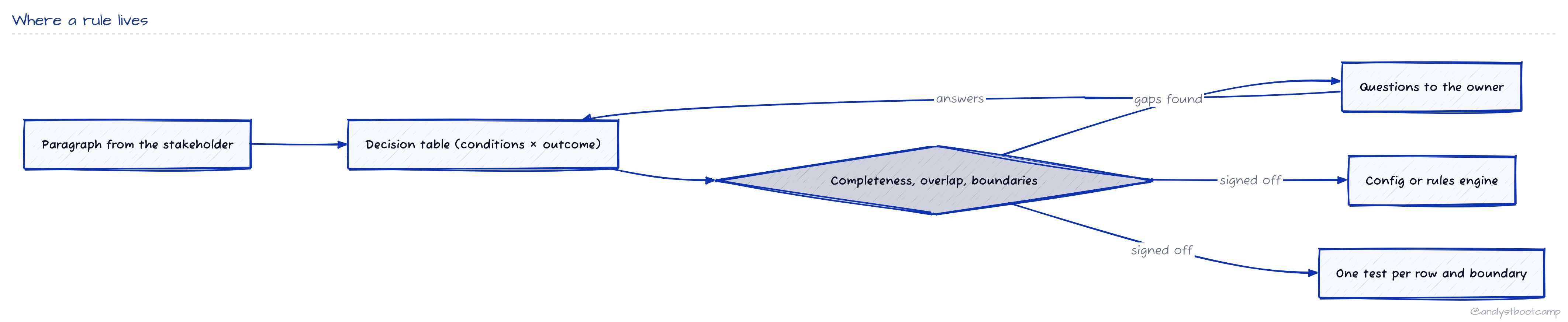
From prose to table in four steps
1. Find the conditions. Underline every "if", "unless", "except", "only", "over", "before". Each one is a condition with a small set of values:
- order amount: < 50 / ≥ 50 (and the boundary question: is 50 included?)
- bulky item in order: yes / no
- customer tier: Prime / regular
- delivery type: standard / express
2. Find the outcomes. Here it is one: delivery fee = free / standard fee / express fee.
3. Lay out the table. One column per condition, one for the outcome, one row per combination that matters. Use "-" for "does not matter": it keeps the table short and shows which conditions are really independent.
| Rule | Amount ≥ 50 | Bulky | Prime | Express | Delivery fee |
|---|---|---|---|---|---|
| R1 | yes | no | no | no | free |
| R2 | yes | yes | no | no | standard fee |
| R3 | - | - | yes | no | free |
| R4 | - | - | - | yes | express fee |
| R5 | no | - | no | no | standard fee |
4. Check it. Three mechanical checks catch the real bugs:
- Completeness: is every combination covered? Amount < 50, bulky, Prime, standard → R3 says free. Was that intended? Ask.
- Overlap: can two rules match the same order? R1 is for regular customers and R3 for Prime, so a Prime order over 50 matches R3 only. R2 (bulky, regular) and R5 (under 50) do not overlap either. Good. If R1 had "-" under Prime, a Prime order over 50 would match R1 and R3: the same outcome today, but the first change to one of them would make the price depend on which rule the code checks first.
- Boundaries: "≥ 50" versus "> 50". The paragraph said "over 50". A EUR 50.00 order is the single most common test case and the single most common bug. Get the answer in writing and put it in the table header.
The table took five minutes and produced two questions for the product owner. The paragraph would have produced two defects in production.
Hit policy: what if two rules match?
Decide and write it above the table. The common choices (the DMN standard calls this the hit policy):
- Unique: rules never overlap; the table is wrong if they do. Best default for pricing and eligibility.
- First: rules are checked top to bottom, first match wins. Fine for "exceptions first, general case last", dangerous when someone reorders rows.
- Collect: all matching rules apply (for example, several discounts). Then you need a second rule for how they combine.
If you do not say which one applies, the developer picks one and the tester assumes another.
When a table is the wrong tool
- Sequences: if the answer depends on what happened before ("second reminder goes out 3 days after the first"), that is a state machine, not a table.
- Calculations: "fee = 2% of amount, minimum EUR 1" is a formula; put it in a sentence with an example, and use a table only for which formula applies.
- One condition: a table with one column is a bullet list. Do not dress it up.
A second example: who can approve
Approval rules are where prose fails most often, because they combine amount, role and relationship:
Expenses up to EUR 200 are approved by the line manager; above that by the department head; above EUR 5,000 by finance; a manager cannot approve their own expenses.
| Rule | Amount | Requester is the approver | Approver |
|---|---|---|---|
| A1 | ≤ 200 | no | line manager |
| A2 | 200 < x ≤ 5,000 | no | department head |
| A3 | > 5,000 | no | finance |
| A4 | - | yes | next level up |
A4 raises the question the paragraph hid: what is "next level up" for a department head's own EUR 150 expense? The paragraph never says who stands above a department head, so the approver for this case is undefined. That is a real gap, found in two minutes, and it is exactly the kind of thing that becomes "approval stuck" tickets later.
Hand-over to the team
- Developers implement the table as is; many teams keep it in a config or a rules engine, and the table in the ticket is the source of truth.
- Testers take one test per row plus one per boundary. The table is the test plan.
- The product owner signs the table, not the paragraph. Keep the paragraph as background only.
With AI
A model will happily turn a paragraph into a table in seconds, and it will also happily invent the hit policy, the boundary and the missing combination. Use it for the first draft, then do the three checks yourself and send the questions to the owner. The questions are the deliverable; the table is how you found them.
Try it (5–10 minutes)
Take this rule: "Customers can cancel an order free of charge within 24 hours, unless it has already shipped; after 24 hours a 10% fee applies, except for digital goods, which cannot be cancelled once downloaded."
- List the conditions and their values. Watch for the boundary at 24 hours and for "downloaded".
- Build the table with a hit policy. Aim for 5–6 rows.
- Write down every question the table raised (there are at least two). Those go to the product owner; the table goes to the team.
Where this shows up in real work
- Job posts for BA and SA roles ask for "documenting business rules and validations"; interviewers hand you a paragraph like the ones above and watch whether you reach for a table.
- In real tickets, pricing, eligibility, approval and notification rules are where "works as designed" disputes come from; a signed table ends them.
- Rules engines and workflow tools (Camunda DMN, Drools, feature-flag configs) take decision tables almost literally; the analyst who writes one saves the developer a translation step.
Sources worth reading
Practice it on real drills
Business rules extractionUse case specificationRoles, permissions & access rules