 Analyst Bootcamp
The problem with "the system should"
Open any backlog and you will find criteria like these:
The system should validate the email address.
Users should be able to export the report.
Both are true and both are useless. A tester cannot build a test from them, a developer fills the gaps with guesses, and the review meeting turns into "I thought you meant…". A Junior+ analyst is expected to write criteria that remove the guessing: a developer can implement them without asking you, and a tester can turn each one into a test case without inventing anything.
Three questions decide whether a criterion is good:
- Can a tester say exactly what to do and what to expect?
- Does it cover the unhappy paths the business cares about, not only the demo path?
- Is it about behaviour, not about implementation ("stored in Redis") or about the UI pixels?
Three shapes that work
1. Rule: "X must / must not Y, when Z"
Use it for constraints that hold everywhere. Numbers and units are mandatory.
An export is limited to 50,000 rows. When the filter matches more, the button stays enabled and the user sees "Narrow the filter: 50,000 rows maximum" with the current count.
Compare: "large exports are prevented" is the same intent with every decision left open: what is large, what happens, what the user sees.
2. Example: Given / When / Then
Use it when behaviour depends on state and input. One scenario per path. The Gherkin format is a convention from the Cucumber tool, but it works just as well in a ticket with no automation behind it.
Scenario: refund after partial shipment
Given an order with 3 items, 2 of them shipped
When the customer requests a refund for the unshipped item
Then the refund amount equals that item's price including its share of delivery
And the shipped items keep their status
The value is in the Given: it forces you to name the state the business forgot to mention (partial shipment). Most defects live there.
3. Checklist: the boring enumerations
Use it for fields, formats, roles and permissions. A table beats prose.
| Field | Required | Format | Error text |
|---|---|---|---|
| yes | RFC 5322, max 254 chars | "Enter a valid email address" | |
| Phone | no | E.164 (+ and up to 15 digits) | "Use the international format, e.g. +49…" |
| Company | yes | 2–120 chars | "Enter the company name" |
Developers copy the table into validation code; testers copy it into test cases. Nobody re-invents it.
Where the edge cases hide
Before you write criteria, walk through this list with the ticket in front of you. It takes five minutes and finds most of what a tester would otherwise find a week later.
- Boundaries: 0, 1, the maximum, the maximum plus one; empty string; leading and trailing spaces.
- State: what if the object is already in the target state (refund twice, cancel a cancelled order)?
- Time: midnight, month end, time zone of the user versus the server, a deadline that has already passed.
- Money: rounding (does 10.005 become 10.00 or 10.01?), currency with no cents (JPY), negative amounts.
- Concurrency: two people do it at once; the same request arrives twice (retries do this all the time).
- Permissions: the same action by a user without the right, by an admin, by a system account.
- Failure of a dependency: the payment provider times out, the email service is down. What does the user see, what is stored?
You will not write a criterion for every item. You write criteria for the ones where the business answer is not obvious, and you put the rest into a question list for the product owner.
A worked example
Ticket as it arrived:
As a customer I want to change my delivery address after ordering so that parcels reach me.
Questions the Junior+ analyst asks (and often answers from existing rules): until when is a change allowed? what if the parcel is already with the courier? does the price change if the new address is in another zone? who is notified?
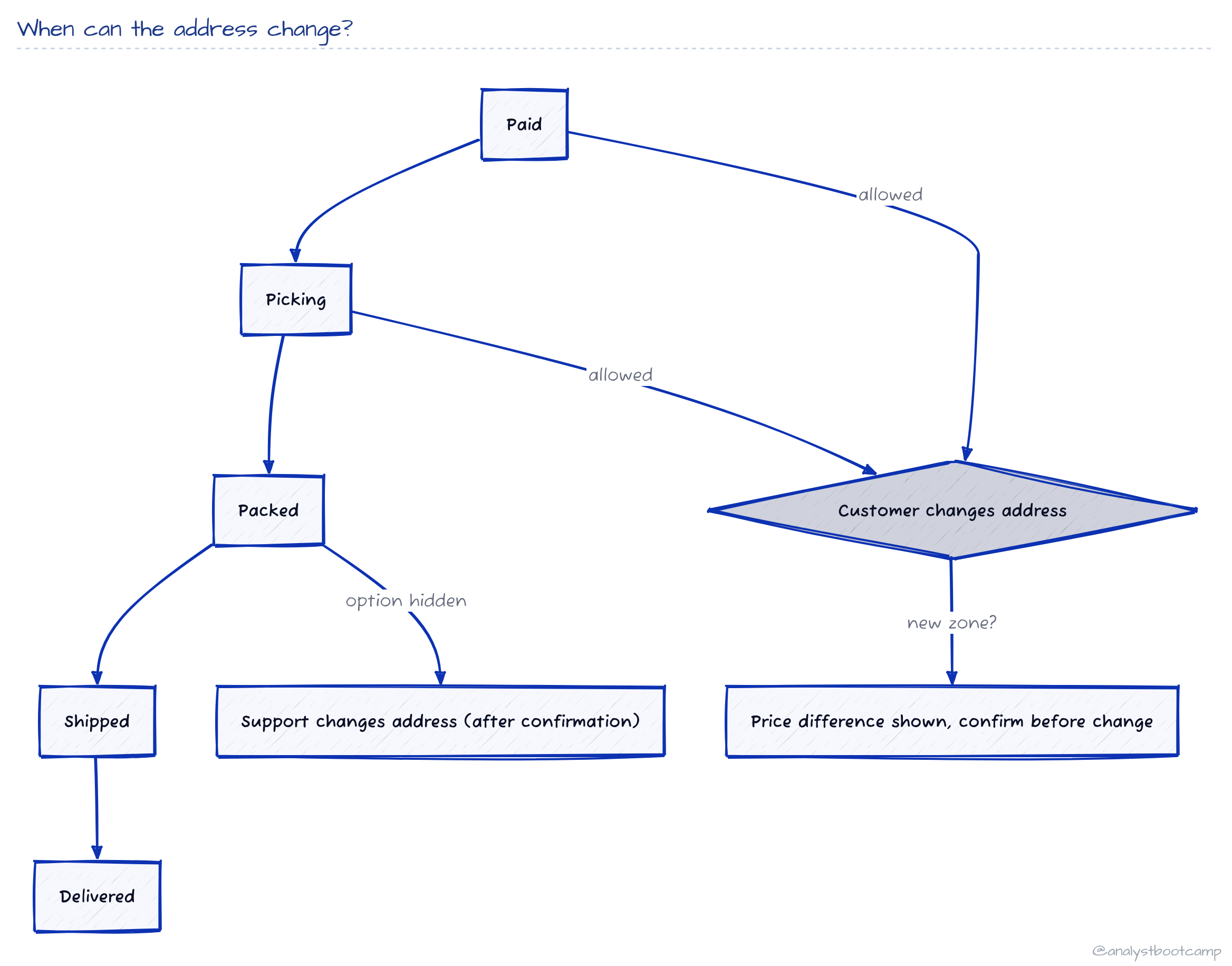
The rule that came out of the questions is easiest to see as the order's lifecycle:
Criteria that came out of it:
- Rule. A delivery address can be changed while the order status is Paid or Picking. From Packed onwards the option is hidden and the order page shows "Contact support to change the address".
- Rule. If the new address is in a different delivery zone, the user sees the price difference before confirming; a lower price is refunded to the original payment method within 5 business days.
- Example.
Given an order in status Picking with delivery zone A (EUR 4.90)
When the customer changes the address to zone B (EUR 7.90)
Then the page shows "Delivery price changes from EUR 4.90 to EUR 7.90" and a Confirm button
And after confirming, the order total increases by EUR 3.00 and a payment request for EUR 3.00 is created
- Checklist. Address fields: as in the registration form (reuse the existing table); country limited to the shipping countries list.
- Open question for the PO. Can the change be made by support on behalf of the customer, and does that need the customer's confirmation?
Notice what is not there: nothing about which button component to use, nothing about database tables, no "the system should". Everything is observable from outside.
Using AI without embarrassing yourself
A language model is good at expanding a draft: give it your three criteria and the edge-case list above and ask "which cases are not covered?". It is bad at knowing your business: it will happily invent a refund policy. The rule for Junior+: AI proposes, you verify every number, every status name and every rule against the real source (the existing ticket, the current behaviour, the person who owns the rule). Never paste model output into a ticket as is.
Checklist before you hit "save"
- Every criterion is testable without asking you.
- Numbers, units, status names and error texts are exact.
- At least one unhappy path per rule that has one.
- Implementation details are out; observable behaviour is in.
- Open questions are listed separately, with a name next to each.
Try it (5–10 minutes)
Take this ticket: "As a user I want to reset my password by email so that I can log in again."
- Spend 3 minutes on the edge-case list (boundaries, state, time, permissions, dependency failure) and write down 5 questions.
- Write 2 rules, 1 Given/When/Then example for the unhappy path you find most likely, and 1 checklist (fields and error texts).
- Read your criteria as a tester: for each one, say out loud the test you would run. If you cannot, rewrite it.
Where this shows up in real work
- Job posts for "Business Analyst (1–3 years)" almost always list "writes user stories with acceptance criteria"; interviewers ask you to write criteria for a feature on the spot.
- In Jira/Linear tickets of real teams the most common review comment is "AC unclear": the fix is one of the three shapes above.
- Freelance briefs ("write user stories for our app") pay for the edge cases: the client already knows the happy path.
Sources worth reading
Practice it on real drills
User stories & acceptance criteriaBusiness rules extractionUse case specification