 Analyst Bootcamp
The backlog where everything is P1
Forty items, thirty-one of them "high". The team picks what is nearest, the loudest stakeholder wins the sprint, and the analyst's job becomes explaining why item 17 is still not done. Prioritisation is not about finding the "right" order; it is about having an order with a reason, written down, that the next escalation has to argue against.
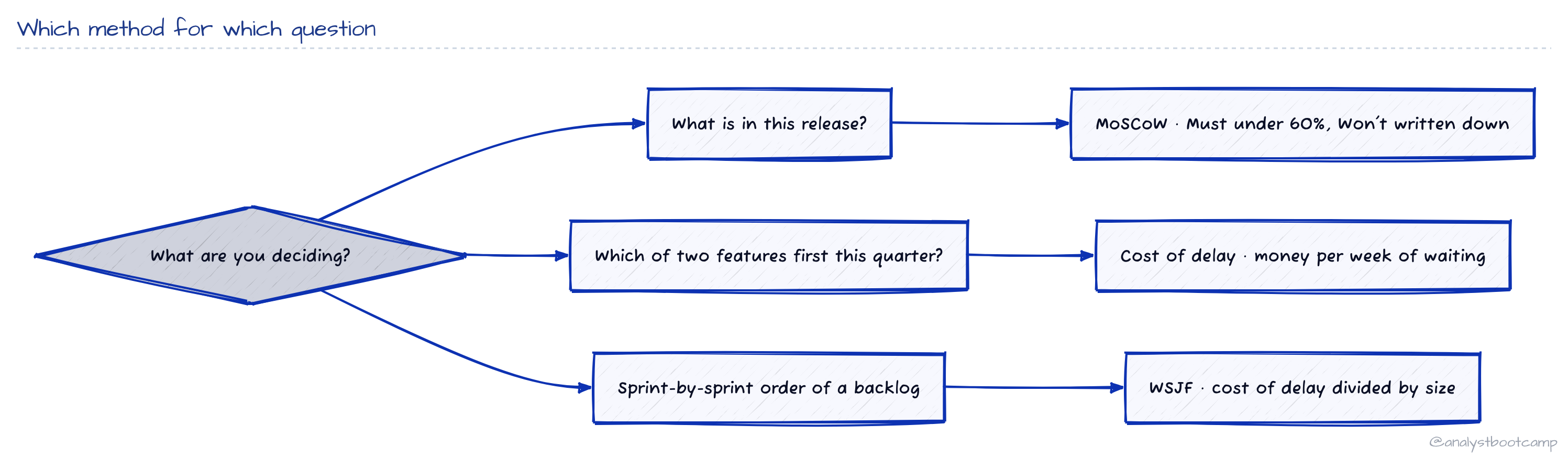
Three methods do that at Junior+ level. They answer different questions, so pick by the question.
| Method | Question it answers | Best for |
|---|---|---|
| MoSCoW | What is in this release, and what is definitely not? | fixed-date scopes, launches, contracts |
| Cost of delay | What does each week of waiting cost us? | choosing between features with different urgency |
| WSJF | Which small, valuable, urgent thing first? | ordering a backlog sprint by sprint |
MoSCoW: scope, not order
Four buckets for a fixed scope: Must (without it the release fails or is illegal), Should (painful to leave out, but there is a workaround), Could (nice, if time allows), Won't (this time; written down so it stops being re-asked).
MoSCoW works only with two disciplines:
- Must is small. A rule of thumb from DSDM, where the method comes from: Must should be about 60% of the effort, so that Should and Could can absorb the surprises. If Must is 95%, the plan has no slack and the date is a hope.
- Won't is written. The Won't list is the most valuable output: it is the list of things you can say no to in week three with a reference.
A launch scope for a "book a call-back" feature:
| Bucket | Item | Why |
|---|---|---|
| Must | choose a 30-min slot in the next 2 working days; confirmation SMS | the feature is nothing without them; legal needs opt-in consent text |
| Should | reschedule or cancel from the SMS link | workaround: call support (which is what we are trying to avoid; move to Must if volume is high) |
| Could | choose a preferred agent language | small, low volume |
| Won't (this release) | video call-backs; integration with the CRM calendar | different system, separate decision |
Cost of delay: put money on waiting
Cost of delay (CoD) asks: if this ships one week later, what do we lose? It turns "urgent" into a number you can compare.
Four shapes of urgency, and how to estimate them in ten minutes:
- Linear: every week costs the same. A feature that saves support 40 hours a week costs 40 hours per week of delay. Multiply by a loaded hourly rate.
- Deadline: nothing until a date, then everything. A regulation with a fine, a campaign with a TV slot. CoD is near zero before, then the fine or the lost campaign.
- Decaying: the value shrinks the later you ship. A seasonal feature, a competitor response.
- Enabling: no direct value, but it unblocks others. Its CoD is the sum of what it unblocks.
You do not need precise numbers. Relative numbers, agreed in the room, are enough to order items, and writing "CoD ≈ 2k/week, estimated with Finance on 14 Oct" is far better than "high".
WSJF: value and urgency over size
Weighted Shortest Job First divides cost of delay by job size. A small item with a moderate CoD beats a big item with a slightly larger CoD, because you get the value sooner and free the team sooner.
In SAFe the CoD is the sum of three relative scores. SAFe itself uses a modified Fibonacci scale (1, 2, 3, 5, 8, 13, 20); many teams simply score 1–10, as below. Size is relative too:
WSJF = (user/business value + time criticality + risk reduction or opportunity enablement) / job sizeScore four items from the backlog:
| Item | Value | Time crit. | Risk/enable | CoD | Size | WSJF |
|---|---|---|---|---|---|---|
| Call-back booking (Must set) | 8 | 7 | 3 | 18 | 8 | 2.3 |
| Reschedule from SMS | 5 | 4 | 2 | 11 | 3 | 3.7 |
| Consent text update (legal deadline 1 Nov) | 3 | 10 | 8 | 21 | 1 | 21 |
| CRM calendar integration | 6 | 2 | 4 | 12 | 13 | 0.9 |
The order falls out: consent text first (tiny, deadline), then reschedule (small, decent value), then the booking itself, then the integration. Two things worth noticing: the scores are relative and argued in a room, not measured; and the method rewards splitting (see User stories that fit a sprint): a 13-point integration cut into a 3-point first slice jumps up the list.
Running the conversation
The method is 20% of the work; the room is the rest.
- Score together, not alone. An analyst's private WSJF is an opinion; a table scored with the product owner, a developer and the loudest stakeholder is a decision they all own.
- Argue the inputs, not the output. When someone disputes the order, ask which score they would change and why. "I think time criticality is 9, not 4, because of the campaign" is a conversation; "it should be first" is not.
- Re-score on new information, not on new volume. A new regulation changes a score; a second escalation e-mail does not.
- Publish the order with the reasons. One table in the wiki, dated. The next "why is this not done" gets a link.
With AI
A model can score a backlog for you in seconds, and the scores will look reasonable and mean nothing, because the inputs (value to your business, your deadlines, your team's size estimates) are exactly what it does not have. Use it to explain the methods to a stakeholder, to draft the scoring table, or to list urgency shapes you might have missed. Score with people.
Try it (5–10 minutes)
Backlog for a small clinic's booking site: (a) online cancellation, (b) SMS reminders 24 h before, (c) GDPR consent banner (regulator audit in 6 weeks), (d) doctor profile pages, (e) waiting-list auto-fill when a slot opens.
- MoSCoW the five for a release in 6 weeks. Keep Must under 60% of effort (size them yourself, relative).
- Give each a cost-of-delay shape and a one-line reason.
- Score WSJF and publish the order with reasons. Then: a doctor insists that (d) goes first. Which input would they have to change, and does it hold?
Where this shows up in real work
- BA and product owner job posts ask for "backlog prioritisation" and name MoSCoW or WSJF explicitly; interview cases give you five items and a date.
- In real teams the dated priority table is what the analyst points at when a sprint is challenged; without it the order is whoever e-mailed last.
- Freelance scoping: MoSCoW with a written Won't list is what keeps a fixed-price project from growing; clients remember the Won't list when they ask for "just one more".
Sources worth reading
Practice it on real drills
Scope cut & prioritization (MVP)Options appraisal (build / buy / do nothing)Decomposition for the team